Steelcase Leap V2 Chair Review of 2026: The Ergonomic Investment That Pays Off

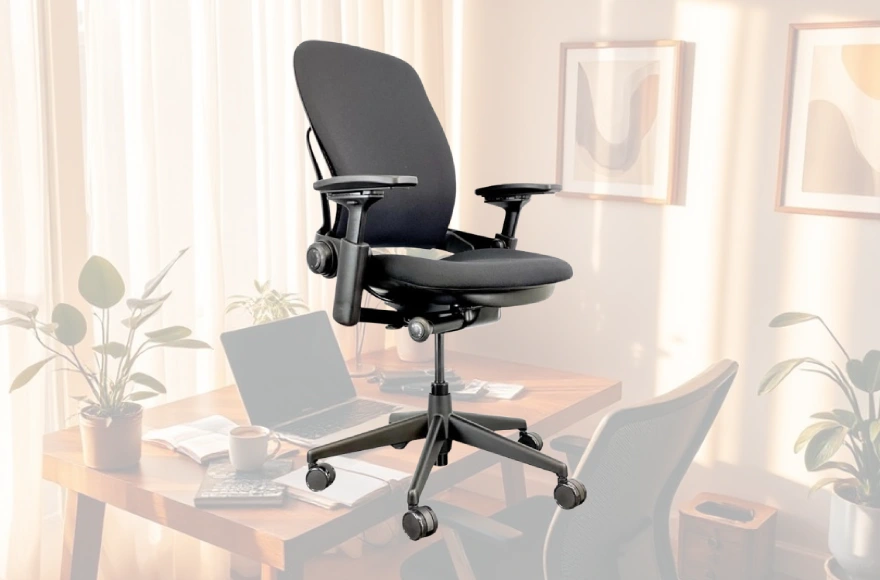
When you spend a thousand-plus dollars on an office chair, you’re betting on more than comfort—you’re betting on durability, adjustability, and support for the countless hours you’ll spend sitting. The Steelcase Leap V2 has dominated the premium ergonomic chair market for nearly two decades, and this review explores whether the hype holds water in 2026.
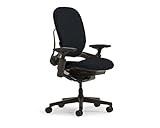


Build Quality Defines Long-Term Performance
The Leap V2 uses a rigid polyurethane frame paired with a flexible backrest. This design allows the back to move with your spine instead of forcing your body into a fixed shape.
The chair carries a 400-pound weight capacity and handles 24/7 usage in corporate environments, open offices, and home setups equally well. Refurbished units from 2006—nearly two decades old—still function after remanufacturing. This demonstrates real durability.
Warranty coverage:
- Lifetime warranty on frame
- 12 years on mechanical parts (gas cylinders, lumbar mechanisms, arm caps)
- 24/7 usage covered on new units
- 40-hour weekly coverage on refurbished models
Most office chairs fail within 5-7 years. The Leap V2 regularly lasts 15-20 years with basic maintenance. Users report purchasing refurbished units in 2015 and still using them today with no major repairs.

LiveBack Technology: Dynamic Spine Support
Most office chairs provide fixed spinal support. Your spine doesn’t work that way. When you recline, your upper spine shifts back while your lower spine arches forward. When you sit upright, the curve reverses.
The Leap’s backrest flexes to match these movements. It doesn’t hold you in one position. Instead, it adapts to each spinal region independently.
How LiveBack works:
- Contoured backrest flexes as you move
- Upper back support adjusts with recline
- Lower back adjusts independently
- Support feels natural, not restrictive
The backrest pairs with two controls. A firmness dial lets you control how much pressure you feel. A height-adjustable lumbar support positions relief where your lower back naturally curves. Together, these create support that fits your unique spine rather than a generic shape.
Users report being able to stretch, twist, and lean throughout the day without losing support. This flexibility matters for people who alternate between typing, phone calls, and screen work, which describes most modern desk jobs.
Dimensions and Capacity
Let’s break down the dimensions of this ergonomic marvel:
- Seat Height: 16” – 20.5”
- Seat Depth: 15.75” – 18.75” D
- Seat Width: 19.25”
- Arm Height: 7” – 11”
- Arm Width: 12.75” – 20”
- Back Height/Width: 25” H / 18” W
- Overall: 24.75” D x 27” W x 38.5” – 43.5” H
Adjustability: The Feature That Fits Everyone
The Leap V2 adjusts in ways other chairs don’t. This breadth of adjustment is why ergonomic professionals consistently rank it first.
Seat height: 15.5 inches to 20.5 inches. This accommodates users from 5’2″ to 6’6″. Most competitors offer limited ranges that exclude shorter or taller individuals.
Seat depth: A slider lets you adjust front-to-back distance. Shorter individuals pull the seat closer, reducing dead space behind their knees. Taller users extend it fully. Poor seat depth creates pressure points; this adjustment eliminates that problem.
Armrests (4D adjustment):
- Height: up and down
- Width: in toward your body or out
- Pivot/angle: rotate for typing or resting
- Depth: slide forward or backward
Most chairs only adjust height. The Leap’s four-way movement lets you position arms for typing, mousing, or resting without compromise.
Lumbar support: Both height and firmness adjust independently. You position support where your back naturally curves and dial pressure to your preference. Some users remove it entirely and rely on the backrest’s natural curve.
Recline mechanism: Five preset positions control how far back you lean. An independent tension knob sets how much force you need to recline. This prevents the chair from feeling rigid or drifting backward uncontrollably.
Seat edge design: The waterfall edge flexes inward slightly. This reduces pressure on your thighs—a common pain point in long sessions.
The chair prints adjustment guides directly on armrest caps. Labels appear in English and Braille. This attention to clarity and accessibility is rare in premium seating.
Comfort: Feature Performance vs. Tactile Feel
Comfort discussions are split into two categories: feature performance and tactile sensation.
Feature performance is where the Leap excels. The flexible backrest allows continuous posture variation. Rigid competitors can’t offer this. The seat’s concave design molds around your body rather than pushing uniformly. Flexible seat edges prevent circulation restriction in your legs. Professional ergonomists cite the Leap’s support across different body sizes and sitting styles as exceptional.
Tactile feel divides users more sharply. The seat padding is intentionally firm and thin (roughly 2-3 inches). High-end ergonomic chairs use thinner, firmer padding because it distributes body weight more evenly. This prevents sinking, which creates pressure points over hours. However, some users find this padding insufficient, particularly in the tailbone area during 8+ hour sessions.
The backrest padding is noticeably thicker, and feedback here is consistently positive. The back feels supportive without being hard. Its ability to flex means it adapts rather than resists movement.
The recline mechanism works differently from traditional chairs. It uses a hip-thrust design where the seat slides forward as the back reclines. This keeps you oriented toward your desk as you lean back, reducing neck and eye strain. Some users prefer this; others find it less satisfying than simple rocking.
Temperature management is a realistic drawback. Foam and fabric absorb and retain heat. During warm months or in offices without climate control, extended sessions (10+ hours) create noticeable warmth. Mesh-backed chairs handle heat better due to superior airflow.
Set Up Mistakes: How to Tune the Chair Correctly
The Leap’s adjustability is powerful, but incorrect setup wastes this advantage. Ergonomic researchers have identified the most common errors.
Seat pan too far forward: Moving the depth slider all the way forward can reduce lumbar contact. The ideal position leaves 2-3 finger-widths between the back of your knees and the seat edge while maintaining full backrest contact.
Lumbar support too aggressive: The included lumbar pad feels pronounced. Many users remove it entirely and rely on the backrest’s natural curve. Others set firmness too high; it should feel supportive, not pushing against your back.
Armrest height mismatch: Your arms should sit at roughly 90 degrees with elbows close to your ribs. Incorrect height changes your entire shoulder position and undermines the chair’s support.
Ignoring the recline function: The recline works best when used frequently (every 30-60 minutes) to shift spinal loading. Users who set it and forget it miss a major feature.
Not adjusting for your body size: The Leap fits users from 5’2″ to 6’6″, but each height range requires different settings. A 5’4″ person and a 6’2″ person need completely different seat depth, lumbar height, and armrest positions.
Strengths: What Justifies the $1,300+ Price
The Leap V2 costs more than most competitors. Here’s what you actually pay for.
Superior adjustability: No other chair in this price range matches the Leap’s adjustment breadth. The 4D armrests alone—available on a few competitors—justify significant premium pricing. You can customize every dimension to your body rather than compromising.
Proven durability: A chair that functions after 15-20 years represents real value over a decade-plus horizon. Cheaper chairs often need replacement within 5-7 years. One Leap owner reports purchasing the chair in 2006 and using it continuously for 19 years with only cylinder and caster replacements.
Spine-specific support: LiveBack technology targets spinal mechanics. This isn’t cosmetic. It’s engineered for long-term spinal health. Studies show proper lumbar support reduces lower back pain by 23-47% in desk workers.
Resale value: The Leap holds approximately 50% of retail value after 3-5 years. If you pay $1,300 and use it for 5 years, you can resell it for roughly $650. Your true cost is $650 over 5 years—about $130 annually.
Warranty coverage: 12 years of mechanical protection with Steelcase backing means failures are genuinely rare. Most manufacturers limit coverage to 3-5 years.
Sustainability: Steelcase reduced the chair’s carbon footprint by 39% and increased recycled content to 25%. CarbonNeutral certification is available. The chair is remakeable through Steelcase’s Circular program, extending its life another 15-20 years.
Limitations: Realistic Drawbacks
The Leap V2 has legitimate constraints.
Thin seat padding: Users with minimal natural padding (very lean individuals) or those with tailbone sensitivity may find the firm seat uncomfortable after 8+ hours. This is an ergonomic feature, but a comfort flaw for padding-first buyers.
Hip-thrust recline motion: If you want traditional backward rocking, the Leap’s forward-sliding motion may feel unnatural. The mechanism works ergonomically but feels different from cheaper office chairs.
Aggressive lumbar design: The lumbar support sits high and firms by default. Taller individuals and those with flat lumbar curves may find it pushes uncomfortably against their back.
Headrest quality is poor: The optional headrest ($199 add-on) tilts too far forward unnaturally. Most ergonomists recommend skipping it entirely.
High upfront cost: At $1,300+, the Leap is expensive initially. Refurbished models ($600-$900) reduce this barrier but come with reduced warranty coverage (40-hour weekly usage limits vs. 24/7 on new units).
Setup requires effort: The adjustability demands actual tuning. Users expecting immediate comfort may be disappointed until they spend 20 minutes optimizing settings.
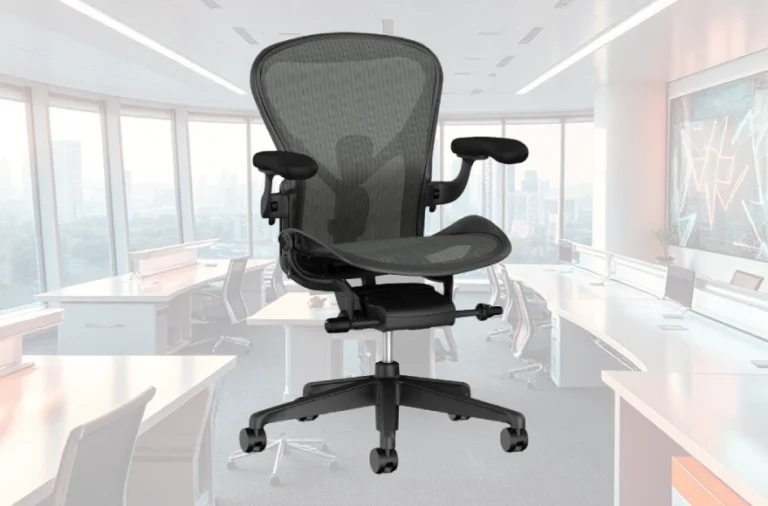
Steelcase Leap V2 vs. Herman Miller Aeron: Direct Comparison
The Aeron and Leap define the premium market. Both cost $1,300-$2,000.
| Feature | Steelcase Leap V2 | Herman Miller Aeron |
|---|---|---|
| Material | Fabric + Padding | Mesh |
| Back Support | Flexible/Dynamic | Rigid/Fixed |
| Seat Feel | Cushioned | Floating |
| Adjustability | 90/100 | 61/100 |
| Best For | Active posture variation | Minimalist simplicity |
| Price | $1,299-$1,400 | $1,500-$2,000 |
| Setup Time | 20+ minutes | 10 minutes |
Seat comfort: The Leap’s padded seat wins for most users. The Aeron’s mesh feels “floating” to some and uncomfortable to others.
Back support: The Aeron’s rigid frame appeals to users wanting to be held in place. The Leap’s flexible back appeals to those who want to move throughout the day.
Adjustability: The Leap offers significantly more adjustment options, particularly in seat depth and armrest depth.
Aesthetic: The Aeron feels more premium and minimalist. The Leap feels more engineered and technical.
Best choice: Select the Leap if you vary your posture frequently. Select the Aeron if you want a minimalist, disappearing chair.
Value Comparison: New vs. Refurbished
New Leap V2:
- Retail price: $1,299-$1,400 (4-way arms, adjustable lumbar)
- With headrest: $1,498
- Warranty: Lifetime frame + 12 years mechanical, 24/7 coverage
Refurbished Leap V2:
- Price: $600-$1,000
- Includes: New upholstery, foam, casters, gas cylinders
- Original: Frame and mechanisms
- Warranty: Typically 40-hour weekly usage limit
Used/secondhand:
- Price: $250-$500
- Condition: 5-10 years old, variable quality
- Warranty: None
Value calculation: A remote worker planning 10-year ownership should buy refurbished ($700-$800). A shift worker or corporate buyer needing 24/7 coverage should buy new ($1,300-$1,400). The refurbished option offers 70% of the experience at 50% of the cost.
Who Should Buy the Leap V2
Ideal candidates:
- Remote workers sitting 8+ hours daily
- People with chronic lower back pain (after ergonomic assessment)
- Users between 5’2″ and 6’6″ in height
- Those who change posture frequently throughout the day
- Organizations are buying multiple chairs for durability
- Anyone planning 10+ year ownership
Poor fit:
- Users preferring thick, plush cushioning (try Steelcase Amia instead)
- People want simple plug-and-play comfort without adjustment
- Budget-constrained buyers with sub-$500 limits
- Those who constantly rock and recline (Aeron suits this better)
- Users in very warm environments (mesh-backed chairs handle heat better)
Final Assessment: Premium Price, Genuine Value
The Steelcase Leap V2 is expensive. The price reflects engineered durability, genuine ergonomic innovation, and support infrastructure that extends two decades. It’s not the most comfortable chair you’ll sit in—that’s subjective and varies by body—but it’s the most adaptable chair at any price point.
For desk workers spending a third of their life in an office chair, the $1,300 investment spread across 12-15 years costs roughly $85-$110 annually. Add the 50% resale value, and the true cost drops further. The Leap V2 isn’t a luxury purchase; it’s a productivity tool that pays dividends through reduced back pain, improved posture, and genuine spine support.
Next steps: Try the chair in person before committing, if possible. Test the seat depth adjustment, lumbar firmness, and recline feel. Budget-conscious buyers should explore the refurbished market, which offers 70% of the performance at 50% of the cost. Either way, the Leap V2 remains the benchmark against which all other ergonomic chairs are measured—not because of marketing, but because it genuinely outperforms alternatives in adjustability, durability, and real-world back support.
FAQs
Is the Steelcase Leap V2 chair worth its price?
Absolutely, especially if you value comfort, durability, and extensive adjustability. It’s an investment in your well-being.
Can I try the chair before buying?
Yes, Steelcase offers a 30-day money-back guarantee, allowing you to test the chair risk-free.
How does the Leap V2 compare to other Steelcase chairs?
While the Leap V2 is slightly less advanced than the Steelcase Gesture, it offers exceptional ergonomic features and a high comfort level.
Are there any cheaper alternatives to the Leap V2?
The SiHoo M57 is a budget-friendly alternative but lacks some of the advanced ergonomic features found in the Leap V2.
Price Disclosure: Product prices mentioned in this review are accurate as of [December 30, 2025] and may change over time due to retailer promotions, availability, or market fluctuations. Always verify the latest price on the merchant’s site before purchasing. We may earn a commission from qualifying purchases at no extra cost to you.