Herman Miller Aeron Chair Review 2026: Complete Guide to Comfort, Sizing & Performance

The Herman Miller Aeron has anchored office environments for 30 years. This isn’t nostalgia—it’s earned authority. The chair appears in countless workplaces, start-ups, and home offices because it solves a fundamental problem: how to support diverse body types without compromise.
But does the premium price tag match the performance? And which size actually suits you? This review examines the Aeron’s construction, ergonomic systems, real-world durability, and competitive position to help you decide if it’s the right investment.


Why the Aeron Matters in Your Workspace
The Aeron isn’t trendy. It’s been in steady production since 1994, redesigned in 2024 with modern materials, and still outperforms most alternatives in specific categories. That longevity signals something important: the chair actually works for the people who buy it.
Two factors drive its dominance. First, designers Bill Stumpf and Don Chadwick engineered the chair specifically to fit different body types without sacrificing quality. Unlike one-size-fits-most competitors, the Aeron comes in three distinct sizes—each adjusted for proportions, not just height. Second, the mesh back and seat create an honest experience: no padding masks structural problems, and no material traps heat during marathons.
If you spend six or more hours daily at a desk, the difference between a good chair and the right chair compounds over months. Poor posture triggers neck tension, lower back pain, and shoulder tightness. An effective ergonomic chair prevents these cascading problems before they start.
Understanding Aeron Sizes: A Practical Comparison
Choosing your size is non-negotiable. The wrong size doesn’t improve with time—it worsens. Here’s what you need to know.
Size A: For Petite Frames
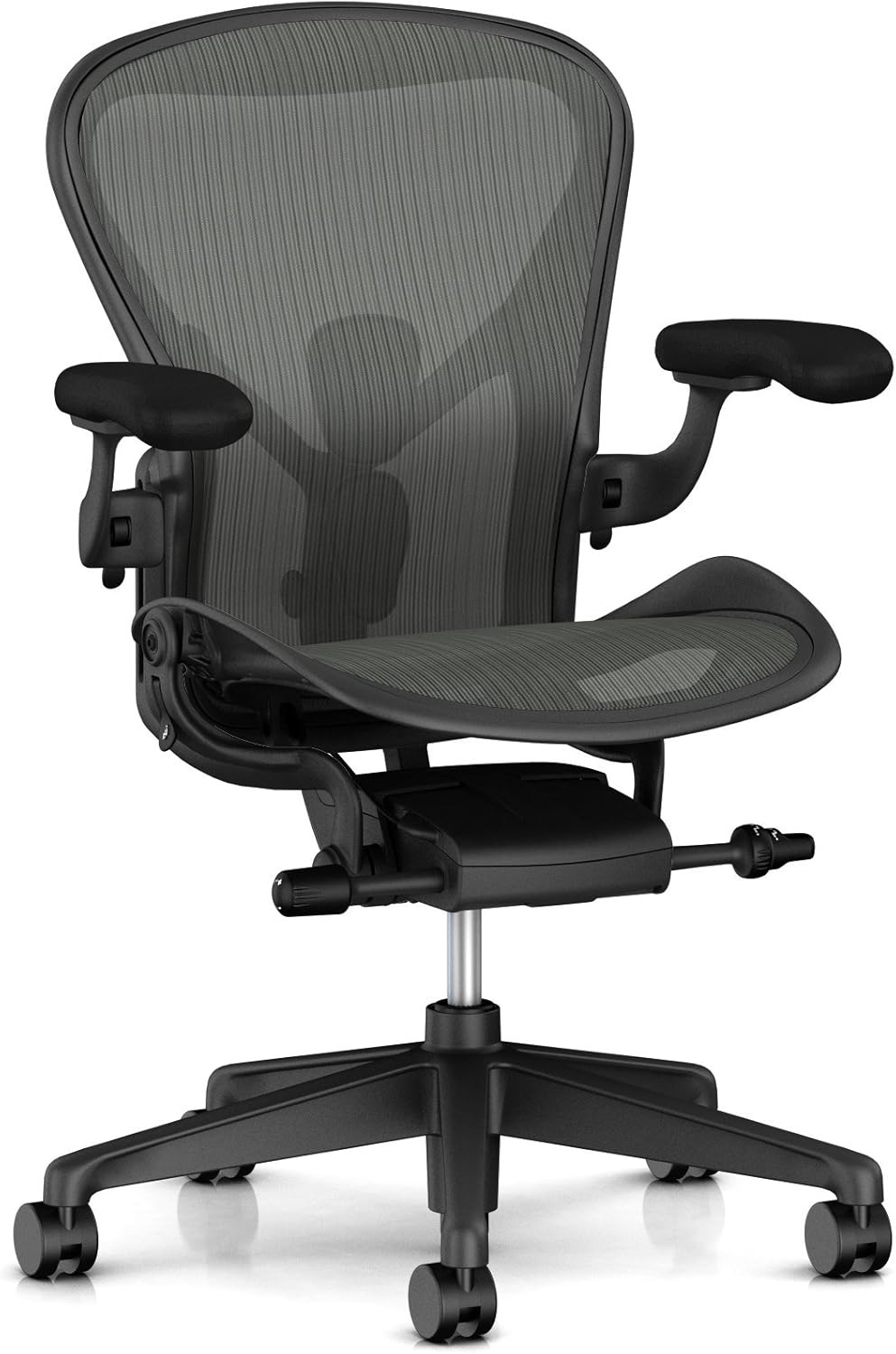
Size A targets users under 5’2″ and weighing up to 125 pounds. The chair rises 34.2″ to 38.5″ at maximum height, with a 16″ seat depth and 15.75″ width.
This size suits anyone in a smaller frame category. The tighter dimensions mean the backrest doesn’t feel like an oversized shell, and the seat depth prevents your legs from extending too far forward—a common problem for petite users in larger chairs. If you’re constantly sliding forward in standard office chairs, Size A likely corrects that immediately.
Size B: The Standard Choice

Size B covers the widest range: roughly 5’2″ to 5’10” and up to 260 pounds. It rises 36.8″ to 41.1″ with a 17″ seat depth and 17″ width.
Herman Miller reports that Size B fits 80-90% of office workers. This middle ground balances support across average proportions. If you fall within the height and weight range but aren’t certain, Size B is the safer default—it accommodates broader flexibility than the other sizes.
Size C: For Larger Frames

Size C accommodates users above 5’10” and weighing 260+ pounds. It reaches 40″ to 45.4″ in height with an 18.5″ seat depth and 18.25″ width.
The extended seat depth matters more than height alone. A 6’3″ user with short legs might prefer Size B, while a 5’11” user with long legs might need Size C. The deeper pan prevents your thighs from extending past the edge, which cuts off circulation and causes discomfort after 2-3 hours.
A Critical Reality Check
Users switching between sizes report stark differences. One 6′ user commented that Size B felt “short in seat depth,” while Size C created too much leg support and triggered pressure behind the knees. At 6’3″, the transition from B to C changes the entire sitting experience—the seat shape flattens, the backrest curves differently, and the armrest spacing shifts.
Your ideal size depends on torso length, leg length, and weight distribution. Herman Miller provides a sizing chart, but testing in person removes doubt. If you can visit a showroom, spend 5-10 minutes in each size before ordering.
Core Design: The 8Z Pellicle Mesh System
The Aeron’s backrest and seat use 8Z Pellicle—a proprietary mesh with eight separate tension zones. This isn’t standard mesh.
Traditional mesh stretches uniformly, sagging over time. Pellicle divides tension across zones: heavier areas (hips, shoulders) get firmer support, while areas with less pressure (behind knees, lower back) maintain flexibility. This zoning prevents the saggy-middle problem that degrades most mesh chairs within 3-5 years.
The result feels different from padded chairs. There’s no cushioning—your body weight sits directly against structured mesh. This takes adjustment. In the first week, users often report firmness. By week three, most recognize this firmness as responsive support rather than discomfort. The mesh molds to your specific shape rather than pressing padding that compresses over time.
Breathability is exceptional. Air circulates constantly, preventing the heat buildup that triggers sweating in summer and that sticky feeling common with fabric or leather. Gamers, traders, and professionals in warm climates report this as a major advantage.
Durability of the Mesh
Forum users with Aeron chairs spanning 15-20+ years consistently report the mesh outlasts other components. One owner replaced the mesh at the 20-year mark—when it finally failed from wear—and discovered the underlying frame was fine. The mesh doesn’t tear easily and resists snagging from sharp objects better than budget mesh alternatives.
The trade-off: if you’re someone who shifts positions constantly (which is good for circulation), you’ll feel that firmness with every movement. This isn’t a “sink in and disappear” experience.
PostureFit SL vs. Standard Lumbar Support: The Back Support Decision
The Aeron’s lumbar system determines how much spinal support you receive. This choice matters more than many buyers realize.
Standard Back Support (Base Model)
The base Aeron includes a simple mesh backrest with no additional lumbar support. For users with neutral or healthy spine alignment, this is sufficient. The mesh itself provides gentle containment, and the backrest curve offers passive support.
However, if you spend 8+ hours daily at a desk with forward head posture or rounded shoulders, you’ll feel the difference when you don’t have active lumbar correction.
Adjustable Lumbar Support
This adds a single foam pad that you adjust manually. Height and depth are customizable. One side of the pad offers lighter support; flip it for firmer pressure.
This works well if your back pain concentrates in one specific zone (lower lumbar region). You dial in exactly where the pad contacts your spine and adjust firmness to tolerance. Users appreciate the control.
The limitation: if your pain spans the entire lower back or includes sacral (pelvic base) discomfort, a single pad doesn’t address the full region. Also, the pad position stays fixed—you adjust it once and live with that placement.
PostureFit SL (Recommended for Most)
PostureFit SL is the Aeron Remastered’s upgraded system. “SL” stands for Sacral-Lumbar. Two independently flexing pads target the base of your spine and lower back separately.
The sacral pad (bottom) supports your pelvic foundation and prevents the posterior tilt that triggers lower back strain. The lumbar pad (top) supports your mid-lower back. Both flex independently as you move—they’re not rigid.
A tension dial lets you control overall pressure. Most users find intermediate settings effective, though users with pronounced lumbar curves may max it out.
This system performed better in user tests than static lumbar support. The flexibility means the pads conform to micro-movements rather than fighting your natural adjustment. Over 8-hour days, this adds up—users report less end-of-day fatigue.
Which Should You Choose?
If you have a history of lower back pain, PostureFit SL is worth the $95 upgrade. If your back is generally healthy, the base mesh support suffices. Adjustable lumbar sits between these—useful for light chronic pain but less effective than PostureFit SL for serious issues.
One caveat: neither system is a cure. If you’re slouching for 8 hours, the best lumbar support can’t fix your posture. Lumbar support prevents strain—it doesn’t correct poor habits.
Adjustability: Moving Beyond Height
Most people adjust only the seat height. The Aeron rewards exploring its full range.
Seat Height and Depth
Pneumatic lift raises the seat 4.9″ across all sizes. This isn’t just comfort—it’s an ergonomic necessity. Your feet should rest flat on the ground with your knees at 90 degrees. Too low, and your knees rise to chest height, cutting circulation. Too high, and your feet dangle, concentrating pressure on your thighs.
The seat itself offers forward tilt—5 degrees beyond fully upright. For detailed work requiring focus, leaning slightly forward keeps your eyes closer to the monitor without hunching. Ease the forward tilt for reading and thinking work where you recline slightly.
Recline Mechanism: The Harmonic 2 Tilt
The Aeron’s recline uses “Harmonic 2,” a synchronized tilt where seat and back recline together while your feet stay grounded. This maintains your spinal alignment as you lean back—the angle preserves your natural curve rather than flattening it.
Standard recline on cheap chairs lets the seat tilt one way and the back another, creating misalignment. Harmonic 2 prevents that.
Three tilt lock positions let you stop the recline at upright, mid-recline, or full recline. The tension dial adjusts how much force you need to activate recline—tighter tension requires more muscle effort; looser tension rewards micro-movements.
Most offices set it to intermediate: loose enough to encourage periodic rocking (which activates stabilizer muscles), tight enough to prevent accidental reclining mid-task.
Armrest Adjustments: Four Dimensions
The fully adjustable option ($436 upgrade) offers height, depth, width, and pivot adjustments.
Height matters when your desk doesn’t match standard ergonomic proportions. If your desk is unusually tall or short, armrests at a fixed height create shoulder strain. Adjustable height fixes this.
Depth (forward/backward) positions your arms closer to or further from your body. Closer positioning naturally relaxes your shoulders; further positioning stretches them slightly.
Width (inward/outward spacing) accommodates different shoulder widths. Narrower spacing works for smaller frames; wider spacing prevents shoulder tension in larger users.
Pivot allows armrests to angle inward slightly, supporting your forearms during typing without forcing your arms into awkward positions.
Most users adjust height and leave everything else untouched. If you have specific shoulder or wrist concerns, the depth and pivot options provide meaningful relief.
Real-World Durability: What Owners Report
The Aeron’s 12-year warranty covers all parts—mesh, gas cylinder, casters, everything. But what happens beyond warranty?
Forum discussions reveal consistent patterns. Users with chairs spanning 15-25 years report the mesh outlasts the padding, but specific failure points appear over time:
- The mesh seat doesn’t tear easily, but it can develop thinning spots with heavy, prolonged pressure
- Gas cylinders occasionally lose pressure (common across all chairs, not unique to Aeron)
- Casters wear faster in office environments with frequent movement
- Plastic components (armrest pivots, frame connectors) develop squeaks but rarely fail completely
The encouraging part: almost all components are field-replaceable using basic tools. A worn mesh seat pan runs roughly $200-300 from Herman Miller. New casters cost $30-50. Gas cylinders are $100-150. Compare this to buying a new chair every 5 years, and the Aeron’s cost-per-year actually becomes competitive with budget alternatives.
One owner noted that after replacing the mesh at the 20-year mark, everything else (frame, base, mechanism) was still fully functional. This is exceptional—most office chairs don’t have a 20-year lifespan.
The Sustainability Angle
The 2024-2025 Aeron uses 91% recycled content and includes ocean-bound plastic in the frame. The chair ships from a carbon-neutral facility and is 100% recyclable when it reaches end-of-life—Herman Miller’s Take-Back program handles refurbishment or material recovery.
If environmental impact influences your purchase, the Aeron’s circular design and parts-replacement model beats buying disposable chairs that fill landfills after 3-5 years.
Pricing and Configuration Reality
The Aeron’s base price hovers around $1,545-$1,850 (USD, 2024-2025) for a fully featured chair. This sticker shock stops many buyers before they learn what that price actually includes.
What You’re Paying For
That price includes a 12-year parts-and-labor warranty (not just a frame warranty). It includes 91% recycled material and Cradle to Cradle v3 Silver certification. It includes field-replaceable components. It includes extensive testing by designers who spent 30 years refining ergonomic positioning.
Compare the cost-per-year: at $1,800 over 15 years of actual use, you’re paying $120 annually. A $500 budget chair lasting 3 years costs $167 annually. Add in the probability you’ll replace the $500 chair twice (because it fails), and the Aeron becomes cost-equivalent while solving back pain instead of creating it.
Configuration Costs
The price varies dramatically based on what you add:
- PostureFit SL lumbar: +$95
- Fully adjustable arms: +$436
- Height-adjustable arms with pivot: +$296
- Leather arm pads: +$167
- Polished aluminum base vs. graphite: +$85-250
- Premium finish colors: +$70-245
A fully loaded Aeron with all adjustability runs $2,400-2,600. A base model with fixed arms hits $1,545. Know your actual needs before customizing—most users don’t need every option.
Head-to-Head Comparison: Aeron vs. the Competition
The Aeron isn’t alone in the premium ergonomic space. Two competitors dominate conversations.
Aeron vs. Steelcase Leap V2
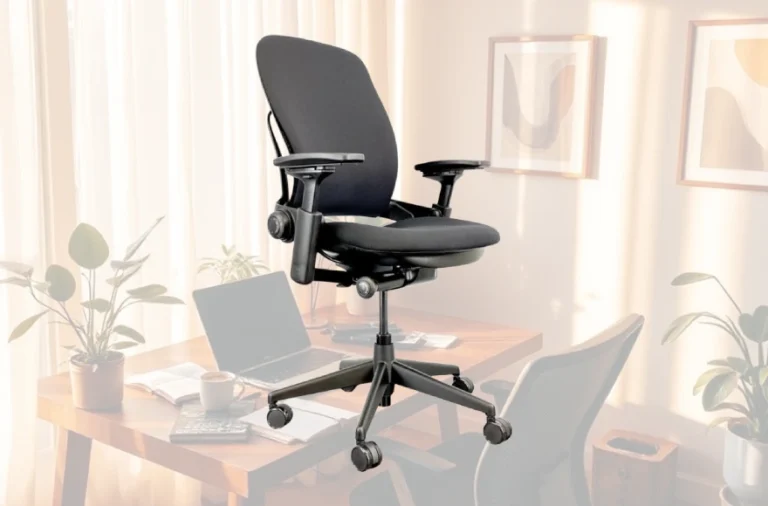
The Leap features dual lumbar adjustment dials—one for upper back firmness, one for lower. This independent control is exceptional. Users can dial in support for their exact spine curve.
The Leap’s LiveBack technology lets the backrest move and flex as you shift positions, providing dynamic support rather than static.
Where the Leap wins: lumbar customization and adaptability to micro-movements.
Where the Aeron wins: breathability (Leap uses partial fabric), simplicity of adjustment, and long-term mesh durability.
Price is comparable ($1,600-2,100). The Leap works better for users with specific lower back issues requiring precise tuning. The Aeron works better for users who want to set it once and forget about it.
Related reading: Steelcase Leap V2 Office Chair Review
Aeron vs. Herman Miller Embody
The Embody uses a pixelated support system—individual pixels under the seat that flex independently. Its BackFit technology continually adjusts spinal support as you move.
The Embody reclines more dramatically, allowing near-full recline. The Aeron limits recline more, keeping you more upright.
Where the Embody wins: dynamic support, reclining flexibility, and users who shift constantly throughout the day.
Where the Aeron wins: breathability (Embody is warmer due to pixel padding), ease of adjustability, and simpler learning curve.
The Embody costs roughly the same as a fully loaded Aeron. Choose the Aeron if you value simplicity and coolness; choose the Embody if you need maximum dynamic support and aggressive reclining.
Common Complaints and Reality Checks
Online reviews reveal consistent criticisms worth examining.
“The mesh is too firm.”
This is accurate initially. Pellicle mesh has high tension to prevent sagging. Most users adapt within 2-3 weeks as they stop comparing it to padded chairs and recognize the firmness as structural support. If you absolutely need padding, the Aeron isn’t the right chair—consider the Embody instead.
“The lumbar support doesn’t fit my exact spine curve.”
PostureFit SL is fixed in position. If your pain concentrates at the very base of your spine (sacral region), you might need more adjustment range than PostureFit allows. The Leap’s adjustable lumbar addresses this better.
“It’s not comfortable immediately.”
Correct. The Aeron requires adjustment and adaptation. You’ll spend 30-60 minutes tuning height, recline tension, and lumbar settings. Budget time for this—ordering and sitting down for one hour doesn’t give the chair a fair trial.
“The seat pan is too narrow/wide for my body.”
This is a sizing issue, not a quality issue. Wrong size = wrong experience. Before blaming the chair, verify you ordered the correct size for your proportions.
“Mesh durability concerns.”
Some users reported mesh thinning after 2-3 years of heavy use or mesh developing small tears. This is rare with Pellicle but it happens. The 12-year warranty covers it, and replacement is manageable. It’s not the complete failure that other office chairs experience.
Who Should Buy the Aeron
The Aeron excels for specific user profiles:
- Professionals logging 6+ hours daily at a desk: The chair pays dividends over 2-3 years through reduced back pain and improved posture.
- Users who tend to overheat in padded chairs: The mesh breathability makes a measurable difference in warm climates or offices without AC.
- Smaller or larger body types struggling with standard chair sizing: The three sizes address the range that standard “adjustable” chairs fail to cover.
- Long-term value prioritizers: If you care about cost-per-year and durability, the Aeron outperforms budget alternatives over a decade.
- Environmentally conscious buyers: The recycled content and circular design matter if sustainability influences your choices.
Who Should Look Elsewhere
The Aeron isn’t right for everyone:
- Budget-constrained buyers: At $1,500+, the Aeron requires upfront investment. For under $500, explore the Sihoo M18 or FlexiSpot C7 instead.
- Users wanting plush padding: If cushioned comfort is your priority, padded alternatives (Embody, Leap) will feel more immediately comfortable.
- People with severe lower back pain: If back pain is disabling, the Leap’s independent lumbar dials offer finer control.
- Frequent sitters who recline aggressively: The Aeron limits recline to preserve spine alignment. The Embody allows deeper recline if that’s essential to your work style.
Long-Term Ownership: Maintenance and Costs
The Aeron requires minimal maintenance but some planning for component replacement:
Year 1-5: Regular cleaning. Dust the mesh monthly. Wipe the frame. Check that adjustment mechanisms stay tightened.
Year 5-10: Monitor mesh condition. Some thinning may appear in high-pressure areas. Casters may start showing wear (replacements are inexpensive).
Year 10+: Plan for mesh replacement ($200-300) or gas cylinder replacement ($100-150) if needed. Everything else typically still functions.
Warranty claims are straightforward. Contact Herman Miller or an authorized dealer with your purchase receipt and serial number. Service is handled efficiently—most repairs take 1-2 weeks.
Final Assessment: Is the Aeron Worth It?
The Aeron’s 30-year market presence doesn’t stem from marketing. It stems from solving a genuine problem: supporting different body types with a durable, adjustable, breathable design.
The chair’s price is premium, but the cost-per-year calculation is more favorable than sticker shock suggests. You’re purchasing durability, warranty coverage, and 30 years of ergonomic refinement.
The mesh firmness isn’t a bug—it’s how the Aeron prevents the sagging that ruins budget chairs. The PostureFit SL support is subtle rather than aggressive, which works perfectly if your back is generally healthy. The size-specific approach means you’re buying a chair matched to your proportions, not forcing yourself into universal sizing.
If you sit 6+ hours daily and currently experience back tension, shoulder tightness, or postural fatigue, the Aeron likely solves these problems. The improvement compounds over weeks as your spine stays properly aligned.
If you’re choosing between the Aeron, Leap, and Embody based on price alone, they’re equivalent investments. Your choice should depend on whether you prioritize simplicity and coolness (Aeron), adjustable lumbar control (Leap), or dynamic support with reclining range (Embody).
Buy the Aeron if you value durability, sustainability, and straightforward functionality. It won’t become obsolete in five years, and it won’t require replacing after a decade. For serious desk work, that reliability is worth every cent.