
Best Office Chair Under 100: Top 10 Budget Picks in 2026

Finding a reliable office chair for under $100 often feels like navigating a minefield of wobbly bases and flat cushions. Most buyers assume they must sacrifice decent posture support to stay within a two-figure budget. That assumption is outdated.
This guide cuts through the marketing noise to identify the few budget chairs that actually deserve a spot in your home office. We analyzed durability, adjustability, and realistic comfort levels to bring you the top picks for 2026.



Why a Budget Office Chair Under $100 Can Still Be Ergonomic
Many shoppers equate “ergonomic” with “expensive,” believing only $500+ chairs can save their backs. While premium chairs offer advanced adjustability, the core principles of ergonomics—neutral posture, lumbar support, and stability—are achievable at lower price points.
A chair does not need 14 adjustment levers to be ergonomic. It simply needs to support the natural curve of your spine and allow your feet to rest flat on the floor. Many sub-$100 manufacturers now use molds and designs originally developed for higher-end models, democratizing access to decent support.
Debunking “Cheap Chair” Myths
The most common myth is that budget chairs are universally fragile. While you won’t get polished aluminum bases at this price, many steel-framed budget options meet strict BIFMA safety standards for weight and durability. The trade-off is usually in the finish or the softness of the armrest, not necessarily the structural integrity of the lift mechanism.
Another misconception is that cheap foam always goes flat immediately. High-density foam has become cheaper to produce. You can find seat cushions in the $80 range that retain their shape for 18-24 months of daily use.
The Value Proposition
The goal of a $100 chair is not to last a decade. The goal is to provide a safe, comfortable working environment for 1-3 years. For students, freelancers, or anyone setting up a temporary workspace, this return on investment is unbeatable. Spending $90 for two years of back pain-free work is a rational economic decision compared to spending $600 for a chair you might not need forever.
Key Features to Look for in a Chair Under $100
When your budget is tight, you cannot afford to pay for gimmicks. You must prioritize features that directly impact your physical health and the chair’s lifespan. Focus on the “bones” of the chair rather than aesthetic extras like colored stitching or racing stripes.
Essential Adjustability
Seat height adjustment is non-negotiable. Your chair must lower enough for your feet to plant firmly on the ground to prevent circulation issues in your thighs. Look for a pneumatic gas lift (Class 3 or Class 4) that operates smoothly.
Tilt tension and lock are the next most critical features. Even a basic budget chair should allow you to rock back slightly or lock the chair in an upright typing position. This movement is vital for shifting your weight throughout the day to keep blood flowing to your spinal discs.
Materials: Mesh vs. Fabric vs. Leather
At this price point, bonded leather is risky. Cheap bonded leather tends to peel and crack within a year, especially in warm climates. It also traps heat, creating a “swampy” feeling during long work sessions.
Mesh is generally the superior choice for budget buyers. It is durable, does not peel, and keeps you cool. If you prefer a cushioned feel, look for fabric upholstery, which is more breathable than cheap leather and more durable than vinyl.
Stability and Build Quality
The wheelbase is the foundation of your safety. Look for a five-star base, which is the industry standard for stability. Nylon bases are common and surprisingly strong, often handling more weight than cheap welded metal bases that may snap at the joints.
Check the caster wheels. Hard plastic casters are standard on budget chairs but can scratch hardwood floors. If you have expensive flooring, factor in the $20 cost of upgrading to rollerblade-style rubber wheels, as stock budget wheels are rarely floor-safe.
How to Test Ergonomics Without Sitting
Read the dimensions carefully before buying. Compare the “seat width” and “seat depth” against a chair you already find comfortable. A seat depth of 18-20 inches is standard; anything less than 17 inches will feel like a child’s chair to an average adult.
Examine the lumbar curve in user photos, not just stock images. Does the mesh look taut or sagging? A sagging backrest offers zero support. Look for reviews that specifically mention “firmness” in the lumbar region, as softness here is a defect, not a luxury.
Red Flags in Cheap Chair Specs
Avoid chairs that do not list a specific weight capacity. A reputable manufacturer will always state a limit, typically 250 lbs or 275 lbs for standard models. Absence of this data suggests they haven’t tested it.
Be wary of “massage” features in sub-$100 chairs. These are usually just vibrating motors that add hard lumps to the lumbar cushion and wiring that can break. That manufacturing budget would have been better spent on better foam or a stronger base.
Best Office Chair Under $100 – Top 10 Picks (2026)
This list prioritizes value, proven durability, and ergonomic geometry. We have categorized these picks to help you find the specific solution for your workspace needs.
1. Furmax Mid-Back Mesh Lumbar Chair: Best Overall Value
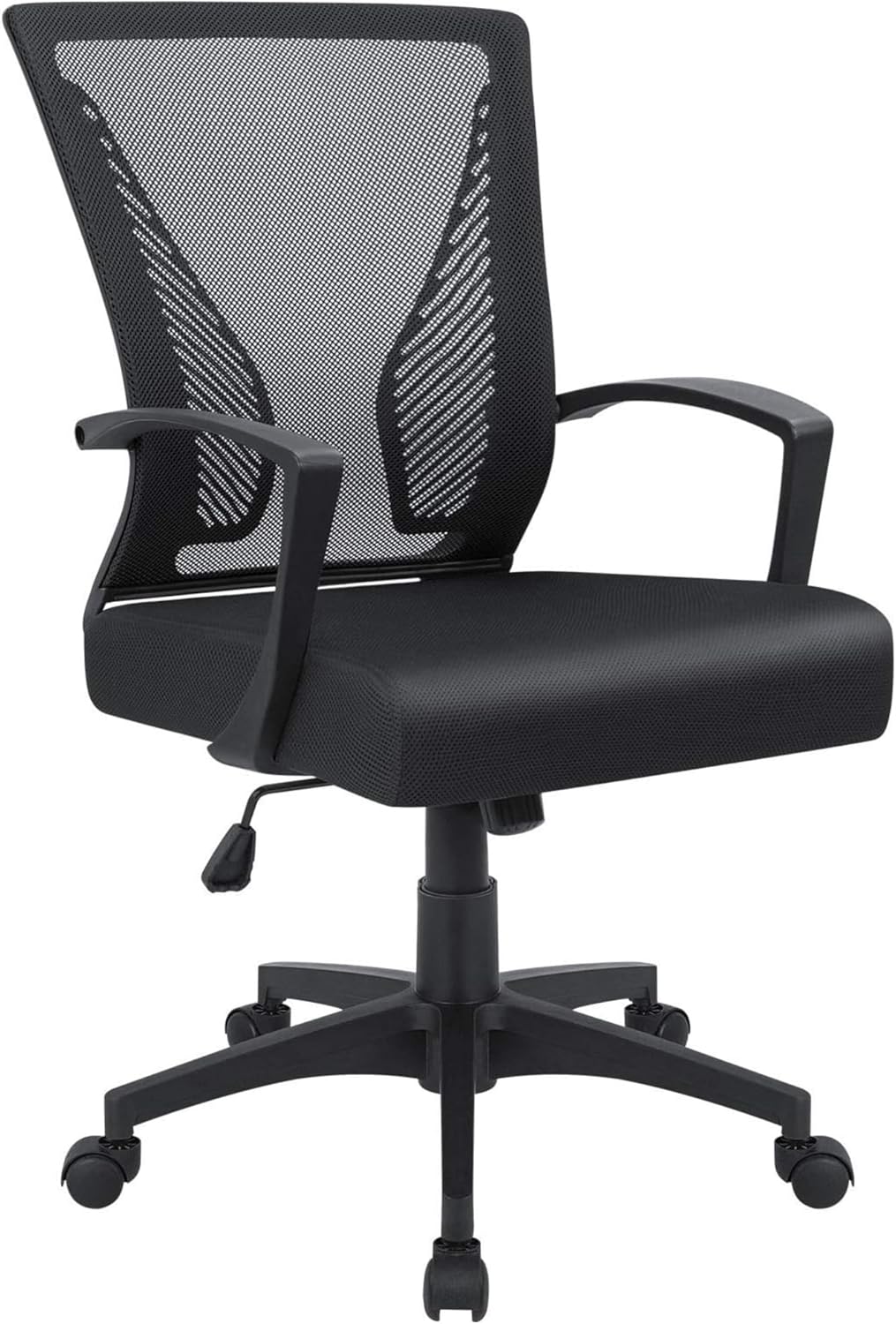
The Furmax Mid-Back is the quintessential budget office chair that gets the fundamentals right without overreaching. It dominates this category because it focuses entirely on the basics: a breathable mesh back, a reliable gas lift, and a compact footprint.
Ergonomic Truth-Check:
This chair features a fixed lumbar support curve built into the frame. It is surprisingly effective for users between 5’4″ and 5’10”. The mesh is taut enough to hold your posture, preventing you from slouching into a C-shape. However, the lumbar is non-adjustable, so if the curve doesn’t hit your spine correctly, you cannot move it.
Why It Wins:
It balances price and performance perfectly. The seat cushion is roughly 2 inches thick, providing adequate comfort for 4-6 hour shifts. The assembly is foolproof, often taking less than 15 minutes. It is the safe, reliable choice for the average user.
- Best For: Students, home office workers, standard height users (5’4″ – 5’10”).
- Capacity: 265 lbs.
- Material: Mesh back, Fabric seat.
2. Amazon Basics Padded Office Desk Chair: Best for Comfort

If you prefer the feel of a traditional sofa over a modern mesh tool, this is your pick. The Amazon Basics chair uses upholstered padding on both the seat and back, offering a warmer, softer sitting experience than its mesh competitors.
Ergonomic Truth-Check:
The ergonomics here are passive. There is no aggressive lumbar curve pushing into your back. Instead, the support comes from the density of the padding and the slight contour of the backrest. It is less about posture correction and more about cushioning.
Why It Wins:
It is incredibly durable for the price. The upholstery is tough, and the frame feels solid. It is BIFMA certified, meaning it has passed rigorous safety tests that many generic brands skip. It is ideal for cooler climates where mesh chairs might feel too drafty.
- Best For: Users who dislike mesh, casual computer use, and cooler environments.
- Capacity: 275 lbs.
- Material: Upholstered fabric (Black).
3. Flash Furniture Mid-Back Swivel Chair: Best for Small Spaces

Space is a premium in many home offices, and Flash Furniture delivers a solution that fits into tight nooks. This chair typically features flip-up arms (on specific models) or a very slim profile that slides easily under small desks.
Ergonomic Truth-Check:
The backrest is shorter than average, hitting the mid-to-upper back rather than the shoulders. This encourages an upright posture but offers no head or neck support. It forces you to engage your core slightly more than a high-back chair would.
Why It Wins:
The aesthetic variety is unmatched. You can find this chair in multiple colors, making it less “corporate” and more suitable for a bedroom or living room workspace. The chrome base adds a touch of style that looks more expensive than it is.
- Best For: Small apartments, dorm rooms, users under 5’9″.
- Capacity: 250 lbs.
- Material: Mesh back, Chrome base.
4. BestOffice Ergonomic Mesh Chair: Most Affordable Pick

This is the chair for when your budget is strictly under $50. It is a stripped-down task chair that provides a place to sit without causing immediate injury. It is basic, functional, and ubiquitous in startup offices and student dorms.
Ergonomic Truth-Check:
Expect basic functionality. The lumbar support is a simple plastic band behind the mesh. It works, but it isn’t luxurious. The seat padding is thinner than the Furmax, so it is best suited for shorter stints of work rather than 8-hour marathons.
Why It Wins:
Price. You can often buy two of these for the price of one premium budget chair. It is lightweight, easy to move, and easy to replace. If you need a chair right now and have very limited funds, this is the functional solution.
- Best For: strict budgets, children/teens, temporary seating (1-2 hours).
- Capacity: 250 lbs.
- Material: Mesh.
5. Smug High Back Ergonomic Chair: Best High-Back Under $100

Most budget chairs are mid-back, cutting off at the shoulders. The Smug High Back offers a taller frame that includes a headrest component, a rarity in this price bracket. This provides support for the upper spine and neck.
Ergonomic Truth-Check:
The headrest is integrated and usually fixed, so check the height dimensions carefully. If you are too tall, it will dig into your shoulders; too short, and your head won’t reach it. When it fits, however, it offers excellent relief for neck strain.
Why It Wins:
It offers the “executive” look and feel for a task chair price. The rocking mechanism is often deeper than that of smaller chairs, allowing for a more relaxing recline during breaks. It feels more substantial and protective than the minimalist options.
- Best For: Users who want neck support, taller users (up to 6’0″).
- Capacity: 250-300 lbs (varies by specific sub-model).
- Material: High-density mesh.
6. Neo Chair Office Computer Chair: Best for Gaming/Style

The Neo Chair bridges the gap between office furniture and gaming aesthetics. It typically features racing-style bucket seats or bold color accents, appealing to those who want their workspace to double as a battlestation.
Ergonomic Truth-Check:
Gaming-style chairs often prioritize “hold” over “support.” The bucket seat design can curl your shoulders forward if you aren’t careful. However, they usually offer thicker padding than mesh chairs, which some users find essential for comfort.
Why It Wins:
It looks premium. The faux leather (PU) is easy to clean and stain-resistant. If you spill coffee, you can wipe it right off. The visual impact is high, making your setup look finished and professional.
- Best For: Gamers, users who prefer leather aesthetics, stain resistance.
- Capacity: 275 lbs.
- Material: PU Leather.
7. Yaheetech Adjustable Mesh Chair: Best for Customization

Yaheetech often includes features like adjustable armrests or a larger seat area that are typically cut from budget lists. Finding armrests that move up and down in this price range is a significant ergonomic victory.
Ergonomic Truth-Check:
Adjustable arms allow you to align your elbows with your desk height, preventing shoulder shrugging. This significantly reduces tension in the trapezius muscles. The mesh is generally high quality and resistant to tearing.
Why It Wins:
It accommodates a wider range of body shapes. If you have a non-standard desk height, the adjustable arms are a lifesaver. The base is usually wide and stable, preventing the “tippy” feeling common in cheap chairs.
- Best For: Users with non-standard desks, those prone to shoulder pain.
- Capacity: 265 lbs.
- Material: Premium Mesh.
8. Homall Gaming Chair (Budget Series): Best Racing Style

Homall is a giant in the budget gaming space. While their pro models cost more, their entry-level racing chairs often dip under $100 during sales. These offer the full high-back, bucket-seat experience.
Ergonomic Truth-Check:
These chairs force a specific posture. If you like feeling “locked in,” it’s great. The included lumbar and neck pillows are detachable, giving you some customization options that fixed-frame chairs lack.
Why It Wins:
The recline function is usually superior, often going back 150-180 degrees. If you like to nap or lounge in your chair, this mechanism is far more robust than a standard office tilt.
- Best For: Full-time gamers, users who recline frequently.
- Capacity: 300 lbs.
- Material: PU Leather, Steel frame.
9. Boss Office Products Perfect Posture: Best Task Chair

This is the tank of the budget world. It often skips armrests entirely or uses rugged loop arms. It is designed for durability and function, often found in medical offices or drafting tables.
Ergonomic Truth-Check:
The “Perfect Posture” name refers to the seat shape, which encourages a forward pelvic tilt. Without arms, you can get incredibly close to your work surface, which is excellent for detailed writing or drawing tasks.
Why It Wins:
It is virtually indestructible. Fewer moving parts mean fewer things to break. The fabric is usually commercial grade, designed to withstand heavy friction.
- Best For: Artists, draftsmen, users who hate armrests.
- Capacity: 250 lbs.
- Material: Tweed/Fabric.
10. Generic Heavy Duty “Big & Tall” Mesh Chair: Best for Heavy Users
While specific brand names rotate, look for the “Big and Tall” descriptor in the $90-$100 range. These generic models reinforce the base and widen the seat plate.
Ergonomic Truth-Check:
The seat width is the key here. Standard budget chairs are 19 inches wide; these are often 21-22 inches. This prevents the hard plastic frame from digging into your hips, which cuts off circulation and causes leg pain.
Why It Wins:
Safety. Using a standard chair when you are near the weight limit wears out the gas lift in months. These reinforced options use stronger pistons and wider bases to ensure longevity for users over 200 lbs.
- Best For: Users 200-275 lbs, wider hip width.
- Capacity: 300+ lbs (advertised).
- Material: Reinforced Mesh/Steel.
How to Choose the Right Chair for Your Body Type
One size does not fit all, especially in the budget category, where adjustability is limited. Buying the wrong size chair is the primary cause of discomfort, not the price of the chair itself. You must match your physical dimensions to the chair’s fixed geometry.
Best Chairs for Tall People Under $100
If you are over 6 feet tall, seat depth is your enemy. A standard 18-inch seat will end mid-thigh, leaving your legs unsupported and putting pressure on your knees. You need a chair with a seat depth of at least 20 inches. Look for high-back models (like the Smug option mentioned above) rather than mid-backs. Avoid chairs with fixed headrests, as they will likely dig into your shoulder blades instead of supporting your neck.
Best Chairs for Heavy Users Under $100
For users over 220 lbs, the standard nylon base of a $50 chair may flex unnervingly. You need to prioritize “Heavy Duty” rated chairs. Look specifically for steel bases (often chrome-plated) rather than plastic. Also, check the seat width. You want at least 20 inches of usable seat width between the armrests. Fixed loop arms are sturdier than T-arms at this price point, offering a solid structure to push off from when standing up.
Best Chairs for Short Users
If you are under 5’4″, many standard chairs will not go low enough for your feet to rest flat. This causes “dangling leg syndrome,” which strains your lower back. Look for chairs with a minimum seat height of 17 inches or lower. Armless chairs or chairs with flip-up arms are often better, as they allow you to pull the chair closer to the desk without the armrests hitting the table edge, letting you maintain proper typing ergonomics.
Decision Matrix: Quick Pick Guide
| User Priority | Recommended Feature Focus | Key Spec to Check |
|---|---|---|
| Back Pain Relief | Fixed Lumbar Curve | “Lumbar” or “Ergonomic Design” |
| All-Day Sitting | Seat Cushion Thickness | “High Density Foam” |
| Hot Environment | Breathability | “Mesh Back” |
| Gaming/Relaxing | Recline Angle | “Tilt Lock” or “150 Degree Recline” |
| Space Saving | Compact Footprint | “Armless” or “Flip-up Arms” |
Realistic Expectations: Lifespan & Maintenance of $100 Chairs
Managing expectations is crucial for satisfaction. A $100 chair is a consumable tool, not an heirloom. Understanding its lifecycle helps you plan your budget and maintenance routine effectively.
Expected Lifespan
In a standard home office environment (used 4-6 hours a day), a decent $100 chair will last approximately 1 to 2 years before showing significant wear. The first point of failure is usually the seat foam flattening out, followed by the gas lift losing pressure (sinking). If you use the chair for 8+ hours a day, expect a lifespan closer to 12-18 months.
Signs of Wear
Watch for the “wobble.” If the seat starts to rock side-to-side on the post, the hub is wearing out. Tightening screws won’t fix this; it indicates the metal or plastic interface is degrading. Another sign is fabric fraying at the front edge of the seat. This is purely cosmetic but signals that the foam underneath is compressing and exposing the frame.
How to Extend the Life of a Budget Chair
You can double the life of a cheap chair with ten minutes of maintenance every few months.
- Tighten the Bolts: As you sit and move, vibrations loosen the screws holding the arms and backrest. Retighten them every 3 months to prevent the frame from flexing and snapping.
- Clean the Casters: Hair and dust get wrapped around the wheel axles, increasing friction. This puts stress on the plastic legs when you try to roll. Pull out the debris with tweezers to keep the roll smooth.
- Don’t “Plop”: The gas lift is a pressurized cylinder. Dropping your full weight onto the chair hard can blow the seal. Sit down gently to preserve the mechanism.
Buying Tips, Discounts, and Where to Buy
The price of budget office furniture fluctuates wildly. A chair listed for $110 on Tuesday might be $85 on Friday. Smart shopping strategies can save you 20-30%.
How to Spot Deals
Amazon and Wayfair are the primary battlegrounds for these chairs. Use price-tracking browser extensions to see the price history. Manufacturers often drop prices significantly during “Back to School” (August) and “New Year” (January) sales events. Look for “clippable coupons” on product pages, which are common tactics sellers use to rank higher in search results without officially lowering the list price.
Warranty Expectations
Do not expect a 10-year warranty like you get with a Herman Miller. Most budget chairs come with a 90-day to 1-year warranty. Be careful with third-party sellers; ensure the listing says “Sold by [Brand] or [Major Retailer]” rather than a random alphanumeric storefront. Major retailers have better return policies if the chair arrives with a defect.
How to Verify Chair Quality Before Buying
Zoom in on the photos of the underside of the chair. You want to see a metal plate connecting the seat to the gas lift, not just plastic. Check the user reviews specifically for the 1-star ratings. Ignore complaints about shipping damage and look for patterns like “snapped base” or “weld broke.” If three or more people report the same structural failure, avoid that model regardless of the price.
Alternatives and Upgrades: When to Spend More Than $100
Sometimes, the smartest budget move is to wait and save another $50. There is a massive quality jump between the $90 tier and the $150-$200 tier.
When an Upgrade is Necessary
If you work from home full-time (40+ hours a week), a sub-$100 chair is a health risk over the long term. The foam density in budget chairs is rarely sufficient for 8-hour daily loads. If you have chronic back pain, sciatica, or coccyx issues, you need a chair with adjustable lumbar support and a seat slider, features rarely found under $100.
The $200 “Budget Premium” Tier
Stepping up to the $150-$200 range unlocks chairs like the Sihoo M18 or better generic ergonomic clones. These chairs introduce adjustable headrests, adjustable lumbar depth, and 3D armrests. They typically offer a 3-5 year lifespan rather than 1-2 years. If you can stretch your budget, the cost-per-year of ownership is often lower with a $200 chair because it lasts three times as long as a $80 chair.
How to Decide If You Need a Premium Chair
Ask yourself: “Does my income depend on me sitting in this chair?” If the answer is yes, treat the chair as professional equipment, not furniture. If you only use the desk for paying bills, browsing the web, or gaming for an hour or two, the $100 options listed above are perfectly adequate and will serve you well.
Best Office Chairs by Category
Best by Features & Functions
Best Office Chairs for Big Tall People
Best Reclining Office Chairs
Best Office Chair for Gaming
